There’s a fairly persistent Moodle myth that comes up whenever upgrades are mentioned:
“Upgrading Moodle is going to be disruptive.”
If you’ve been through an upgrade where a critical plugin suddenly didn’t work, testing was squeezed into the last few days before launch, or somebody discovered an integration nobody had thought about until it broke, you’re probably not going to be particularly excited about doing it again.
But none of those things are inevitable parts of upgrading Moodle.
A well-planned upgrade should be controlled and relatively predictable. There will always be some risk, including issues that only become visible once real users return, but that’s why monitoring and follow-up form part of a good upgrade strategy too.
In this blog, we look at the decisions that can reduce that risk, from choosing the right version and timing to testing, ownership and support after go-live.
We have also created a Moodle Upgrade Readiness Worksheet to help your team work through each area.
1. Why are you upgrading?
Being on the newest Moodle version isn’t an objective in itself. There should be a clear reason for making the change.
Your current version might be approaching the end of security support. A newer release might offer functionality that would make a genuine difference to staff or learners. Or plugins and integrations may be becoming harder to maintain.
Alternatively, waiting could be the right decision for you, but it should also be an informed one. Over time, plugins, integrations, customisations and infrastructure can all move away from where they need to be, making a future upgrade more complex.
Whether you upgrade now or later, be clear about why, what you expect to achieve and when the decision will be reviewed.
2. Are you choosing the right Moodle release?
Once you’ve decided to upgrade, you need to decide which version you are upgrading to?
For some universities, an LTS release makes sense. Longer security support and fewer major upgrades can fit well with academic calendars and limited windows for change.
For others, interim releases provide access to new Moodle functionality sooner and can allow change to be introduced in smaller increments.
Neither route is automatically better.
Consider how often your institution can realistically manage, test and communicate change, and whether a particular release offers functionality you need.
Your wider Moodle ecosystem matters too. If you discover that an essential plugin or integration isn’t ready for your preferred version you may want to reconsider your upgrade path.
Read more on the LTS versus regular release decision, LTS Software vs. Regular Releases: Making Informed Choices for Your Organisation.
3. How well do you actually know your Moodle?
Over time, Moodle environments grow. A plugin gets installed for one project. An integration is built for another. Somebody adds a custom report. Authentication changes. The theme gets customised. A small piece of development becomes business-critical without anybody really noticing. This can add up to a complicated ecosystem, and an upgrade shouldn’t be the point at which you discover it.
Before planning, build a clear picture of what your Moodle depends on.
Look beyond Moodle itself, at plugins, authentication and SSO, themes, integrations, reporting, custom development and connections with other university systems.
And question what you find: Do we still need this?
An upgrade doesn’t have to mean carrying every historical decision forward. Sometimes removing an unused plugin or retiring an old customisation can be just as valuable as adding something new.
Understanding what you have, and what you still need, makes it much easier to identify where to focus during the upgrade.
4. Is this actually the right time?
Technically, you might be able to upgrade Moodle next Tuesday. That doesn’t necessarily mean you should.
Universities have some particularly unforgiving periods for platform change. Assessments, exams, enrolment, results publication and course creation can all make an otherwise sensible upgrade window the wrong one.
What else is happening across the institution? Is another major system changing? Are staff already being trained on something new? Is your IT team managing another significant project?
Sometimes you will need to work with a wider team to collaborate and decide on the best time, which could mean waiting a little while.
What matters is understanding why you’re waiting, the risks involved and when you’ll revisit the decision. Delaying an upgrade can be part of a sensible strategy when the timing and implications are understood.
5. Does your staging environment tell you anything useful?
A staging environment is only valuable if it gives you a realistic picture of what is going to happen in production.
It should reflect your live Moodle closely enough that you can genuinely test the upgrade.
It should also allow you to test the things that actually matter: plugins, integrations, customisations and the workflows people rely on every day. The people who understand those workflows also need the opportunity to use them.
Staging should give the people involved enough confidence and evidence to make a sensible go/no-go decision.
6. Are you testing Moodle, or just checking that it looks OK?
Seeing the Moodle homepage after an upgrade is reassuring but it isn’t really a thorough test.
Testing an upgrade means checking how people actually use Moodle, not just confirming that the homepage loads.
Start with the journeys that matter most in your institution.
Can users log in through your normal authentication or SSO process? Can students access the right courses? Can they submit an assignment? Can somebody sit a timed assessment? Can academics grade work and use the gradebook as expected?
Check roles and permissions, integrations, reports, notifications, accessibility, browsers and mobile devices.
A workflow used by 10,000 students during assessment week deserves more scrutiny than a feature used by three administrators twice a year.
Focus your testing where failure would have the greatest impact. This makes testing more manageable while giving your highest-risk workflows the attention they need.
7. Does everyone know who owns what?
This is one of the less technical parts of an upgrade, but it can make a huge difference when something doesn’t go quite to plan.
Before the work starts, everyone involved should understand who is responsible for the key decisions and activities.
Who makes the final go/no-go decision? Who owns testing? Who communicates with staff and students? Who investigates issues identified during testing? What would cause the upgrade to be postponed or rolled back, and who makes that call?
Ownership needs to continue beyond launch, too.
Clear ownership makes decision-making easier, particularly when several university teams are involved, and avoids having to work out responsibilities when an issue is already affecting the platform.
8. What happens once Moodle is live again?
An environment that behaves perfectly with 50 people using it on a quiet Friday afternoon may behave very differently when thousands of students arrive for an assessment.
Once the platform has been through real-world use, capture what you learned. What took longer than expected? What did testing uncover? What would you change next time?
Capturing those lessons makes the next upgrade easier to plan and more predictable.
One final check: the Catalyst 5 S Test
An upgrade isn’t just about moving to a newer version of Moodle. It’s also an opportunity to consider whether your platform is heading in the right direction for the longer term.
At Catalyst, we use our 5 S Test to help us look at technology decisions from a wider perspective. It’s a useful way to sense-check your upgrade plans and consider what success should look like.
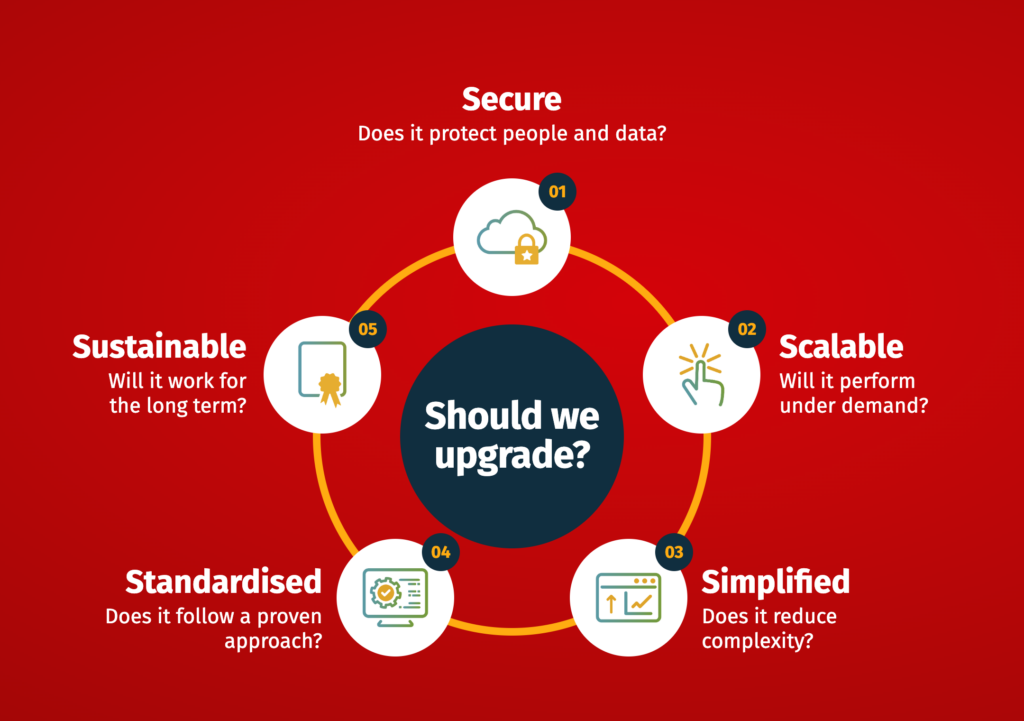
You don’t necessarily need a perfect answer to every question. Often, the most useful part is identifying where you don’t yet have one.
So, is your Moodle ready to upgrade?
Moodle upgrades don’t have to mean disruption.
There is always risk in making a significant change to a live platform, and no amount of preparation can guarantee that an unexpected issue won’t appear. But disruption shouldn’t be treated as an inevitable part of upgrading Moodle.
When you understand your environment, choose the right release and timing, test the workflows that matter, establish clear ownership and plan for what happens after go-live, an upgrade becomes a controlled piece of change rather than a leap into the unknown.
Start with the Moodle Upgrade Readiness Check
Download our Moodle Upgrade Readiness Worksheet and work through it with the people involved in your Moodle platform.
Use it to record your answers, identify gaps in your current plan and turn those gaps into clear actions, owners and deadlines.
It won’t make every upgrade decision for you. But it should give your team a much clearer picture of how ready you are, and what needs to happen next.
Upgrades without disruption? You can with Catalyst.